United expert mode
If anyone ever mentions this, just know that they are locked in on award travel
Dez · Sep 8, 2026 · 4 min read

Bet you didn’t know about this trick, but there is a function that's never advertised that allows you to check the fare classes and the number of seats left — think seat map but more sophisticated.
Note that this is an advanced strategy and will take time to learn if you have no clue how award tickets work.
Fare breakdowns
United offers at least 35 fare classes you can see through expert mode if you’re on a three-cabin aircraft. Each fare class, which often correlates with your ticket price, has its own rules.
Before you dive into expert mode, you’ll want to understand the different fare classes and what they can provide you. Otherwise, turning on United’s expert mode won’t be helpful. Here are a few key fare classes you’ll want to keep in mind:
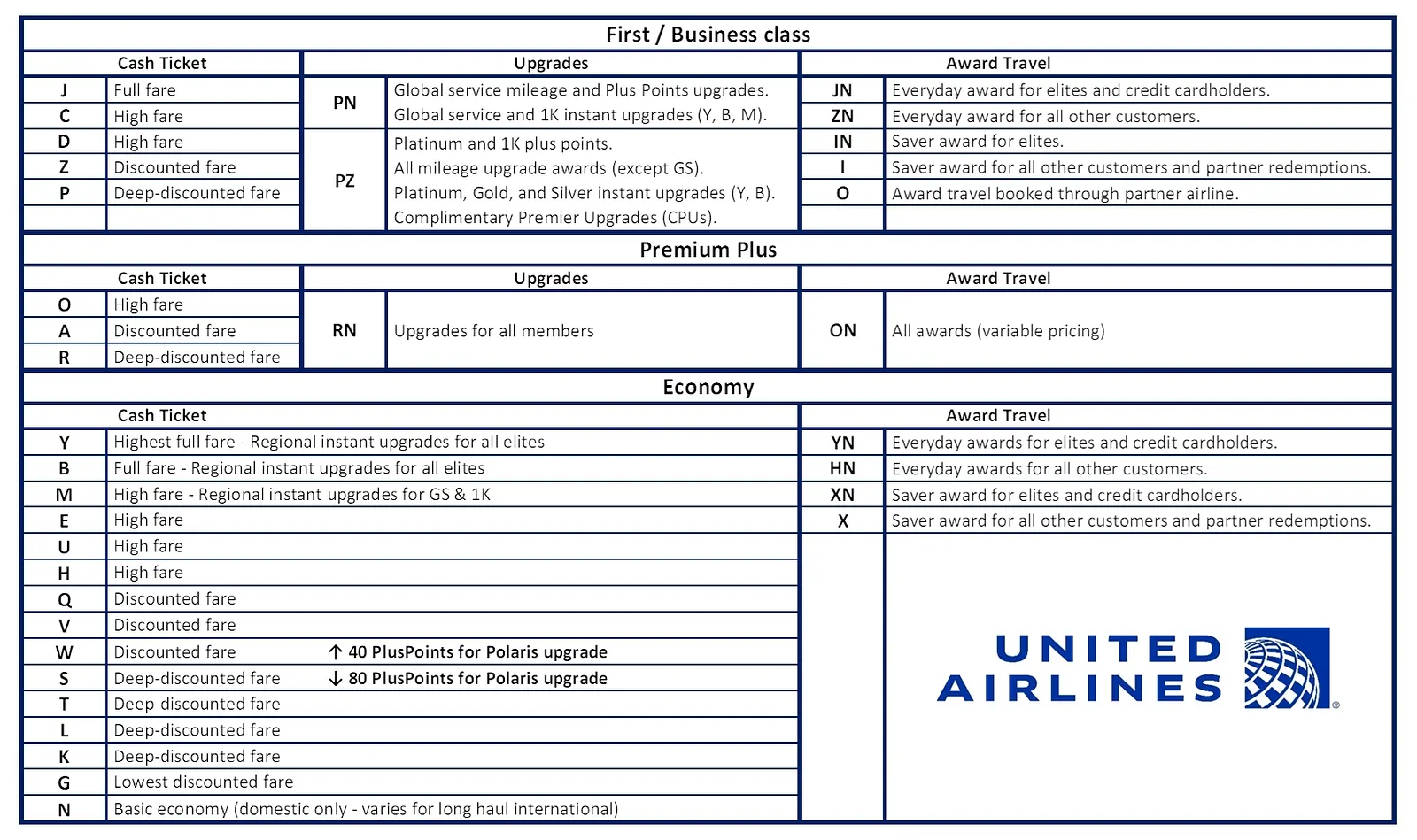
Award Travel - pricing is based on the cardholder and elite status of the booking member (Chase United credit card holders get a points discount for redemption)
Upgrades
- PZ: Confirmed upgrades to business or first class using PlusPoints or miles.
- PN: Premier members are eligible for instant first-class upgrades on most domestic full-fare economy Y-class and B-class fares. Premier 1K members are also eligible for instant upgrades on most domestic routes when booking the M-class fare. Global Services customers are eligible for upgrades in nearly any fare class when PN space is available.
- RN: Confirmed upgrades to Premium Plus using PlusPoints or miles.
Saver award tickets
- IN: Saver business or first-class awards for some elites and some cardholders.
- I: Saver business or first-class awards for all other customers and partner redemptions.
- XN: Saver economy awards for all elites and most credit cardholders.
- X: Saver economy awards for all other customers and partner redemptions.
Everyday award tickets
- JN: Everyday business or first-class awards for some elites and some credit cardholders.
- ZN: Everyday business or first-class awards for all other customers.
- YN: Everyday economy awards for all elites and most credit cardholders.
- HN: Everyday economy awards for all other customers.
Revenue tickets
- Economy class: N, G, K, L, T, S, W, V, Q, H, U, E, M, B and Y.
- Premium Plus: R, N and O.
- Business class: P, Z, D, C and J.
First/business class
- Full fare: J.
- High fare: C, D.
- Discounted fare: Z.
- Deep-discounted fare: P.
Premium Plus
- High fare: O.
- Discounted fare: A.
- Deep-discounted fare: R.
Economy
- Highest full fare: Y
- Full fare: B
- High fare: M, E, H, U
- Discounted fare: Q, V, W
- Deep-discounted fare: L, K, S, T
- Lowest discounted fare: G
- Basic economy: N (on domestic flights)
Turning on expert mode
Note that Expert Mode only appears when you're logged in to your MileagePlus account and searching for paid tickets (not award tickets). If you select miles, the fare classes won’t show when you click Details.
Using United Expert Mode
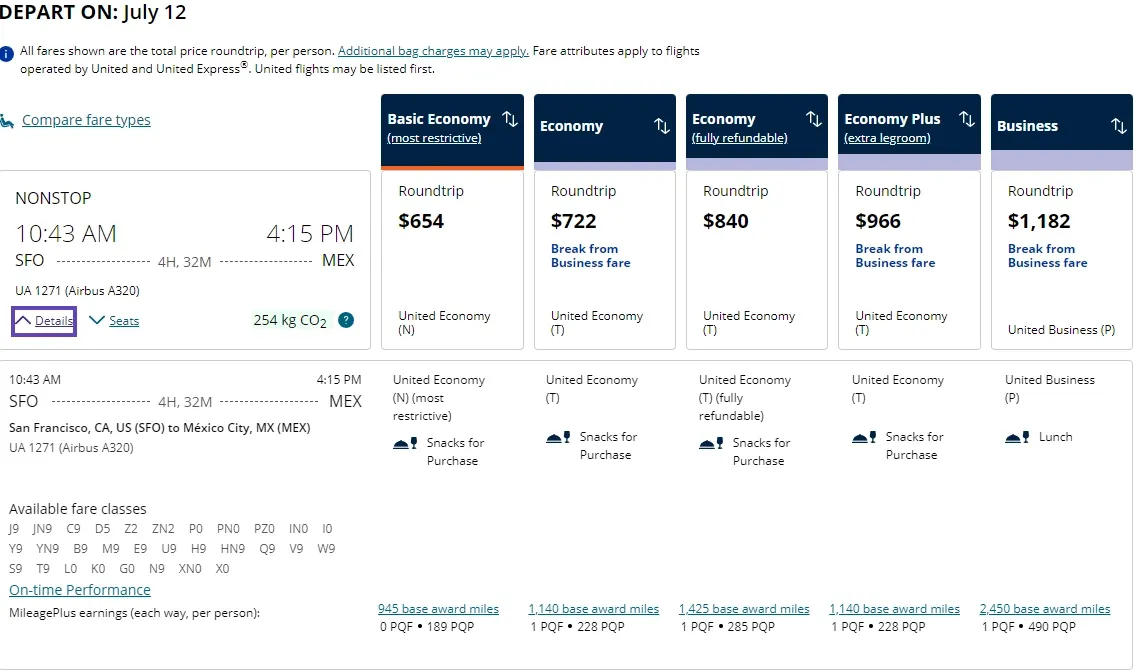
Recalling the criteria above, we can match the fare code & see how many seats are left. Take note of the letters & the numbers next to them
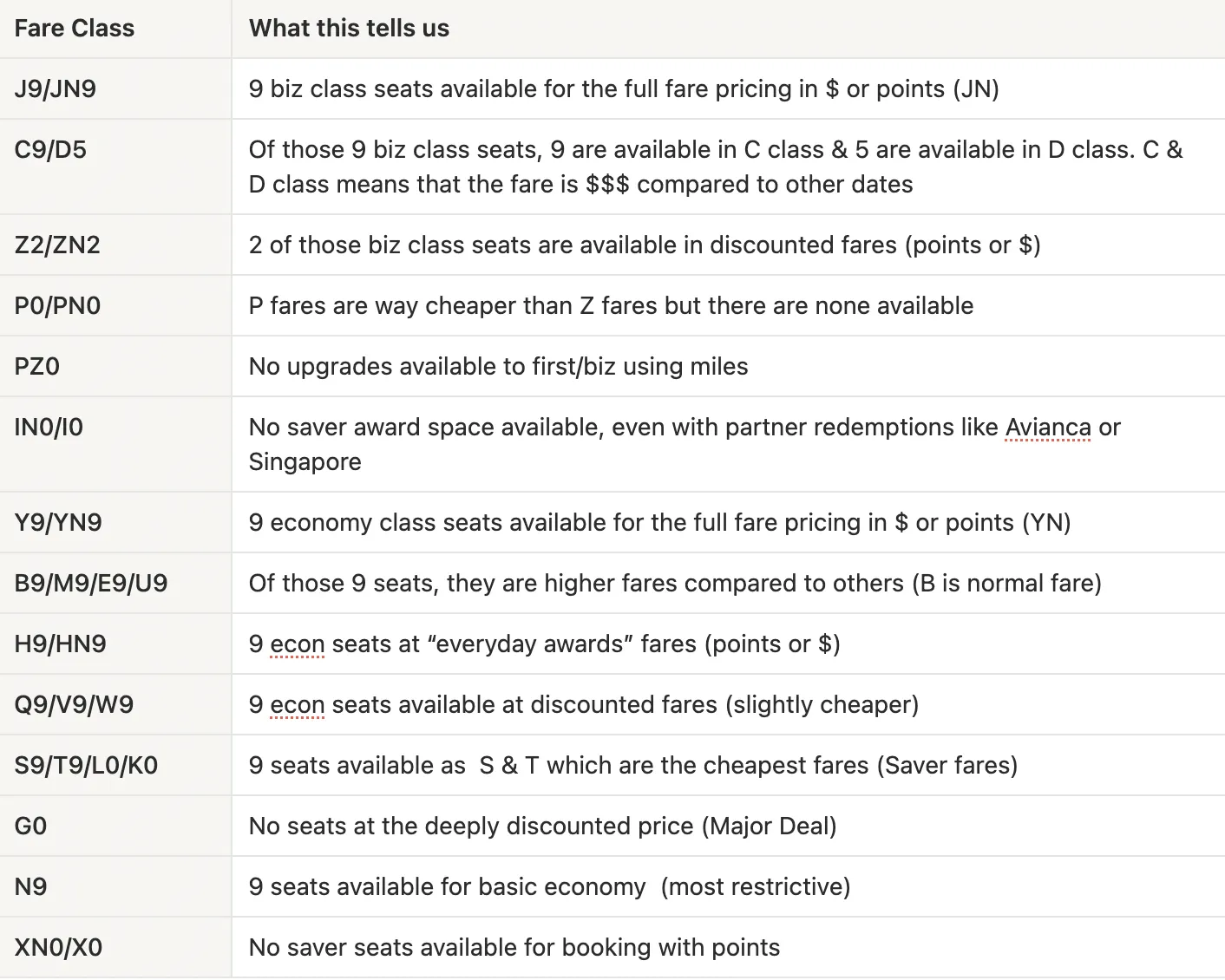
The format shows the fare class + the # of seats allocated to that fare class.
What does this tell me?????
- For anything ending in 0, it can mean either two things:
- They sold out of seats for that fare class
- They are not offering seats at all for that fare class
- For award travel, it tells you how many seats they are releasing on points
- Tells you whether you have the option of buying that seat outright or paying to buy an economy seat and pay for a confirmed premium cabin upgrade
- For frequent flyers, it also tells you what fares are eligible for instant upgrades (like B class fares)
- If you’re also dead set on redemption value (cpp), it immediately identifies whether you are paying full price or a discounted award fare
- The numbers tell you how many seats are available at that price
- S9 & T9 means there are 9 seats available in this fare bucket; you can book up to 9 people at this price but not anymore
- Most important — PARTNER AIRLINE AVAILABILITY
- isn’t always the most up-to-date, but it gives you a good sense of whether airlines are opening up their seats to partner bookings
When to use expert mode?
Expert Mode quickly tells you exactly how many seats are available for awards and upgrades in every cabin at the Saver and Standard level
This saves you from running multiple award searches and adjusting parameters like passenger count each time. It can also help forecast upgrade odds on the flights you pick too (though anything can change on the day of departure)
What I find the value in is two things:
- Partner award seats (I don’t fly United often, but I heavily rely on Star Alliance airlines)
- The number of seats available to elite/cardholders and the discount they get. If it's big enough, then you can consider opening the card or freeloading on an elite member to book the flight for you to take advantage of the discount
More from the blog

Oct 20, 20269 min readSubscribers
Points maxxing
A little glimpse into how I operate and spontaneously full send on trips without ever worrying about budget

Sep 11, 20268 min read
Jet Lagged 001: Saigon (HCMC), VN
Notes from a rough landing

Sep 10, 20261 min read
Hyatt x Delta Airlines partnership
And a farewell to American Airlines I guess